Search This Blog by Google

Search This Blog

Welcome to Dijemeric Visualizations

Where photography and mathematics intersect with some photography, some math, some math of photography, and an occasional tutorial.

Total Pageviews

Wednesday, April 04, 2012

Using L.A.B. in Photoshop - Some Basics


Using LAB in Photoshop – Some Basics
Ken Osborn © 2012

L.A.B. is a color profile like RGB.  Unlike RGB, L.A.B. separates colors into two channels, the ‘a’ and the ‘b’, and the luminosity into a third, ‘L’, channel.  Thus working with L.A.B., unlike working in RGB, allows adjustments to the color independently of the luminosity. 

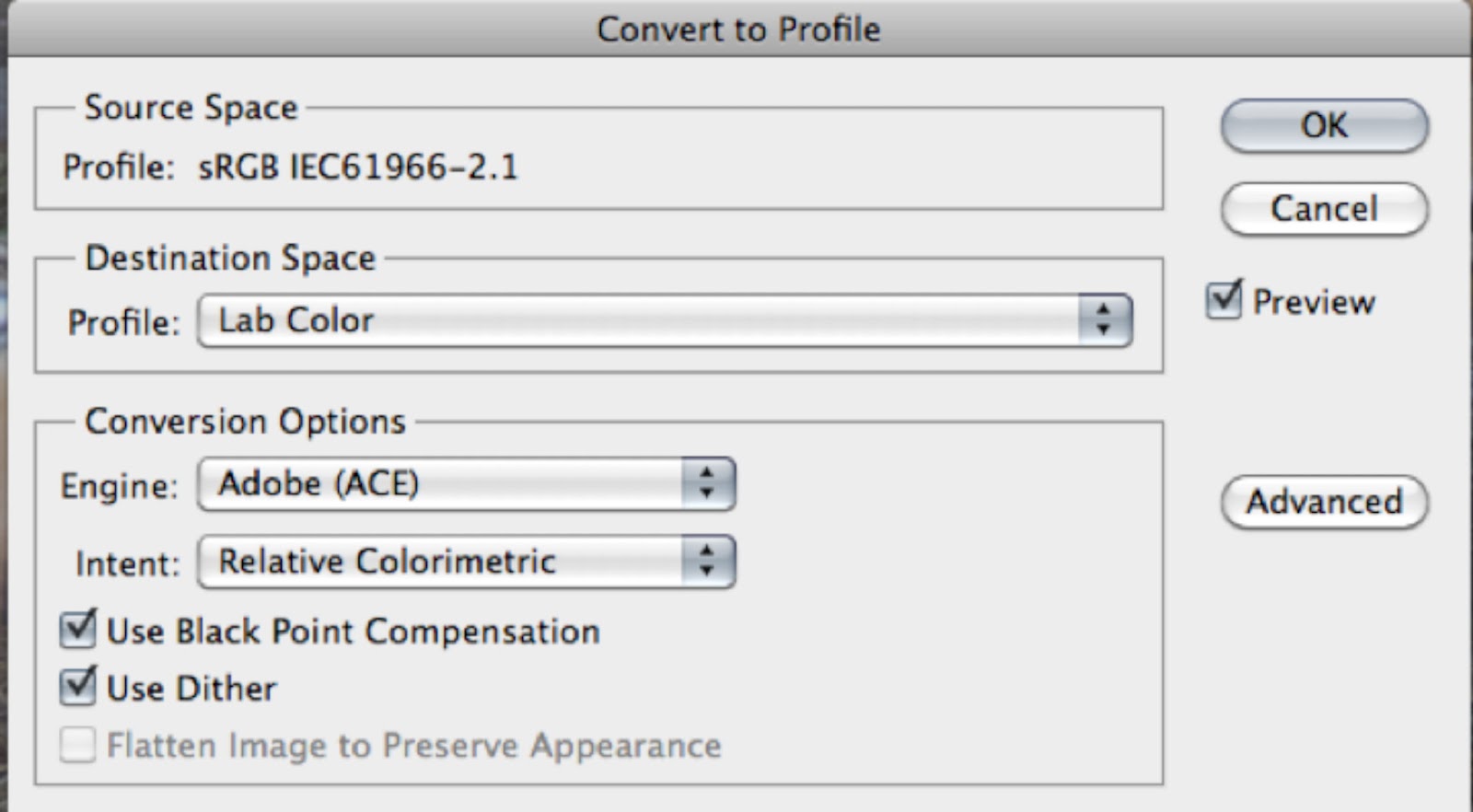
The default color mode in Photoshop is usually RGB.  To convert an image from RGB to L.A.B. use either the Image>Mode>Lab Color (Fig 1) or Edit>Convert to Profile (Fig 2).  Dan Margulis (“Photoshop Lab Color”) recommends converting to profile.

Fig 1: Changing color mode
 

Fig 2: Convert to Profile


Before showing how to use L.A.B. on an image, I’ll give a tweek or two using RGB so you can compare the results.  I’ll use an image that I think has some potential but is low in contrast and a bit soft (Fig 3).  A quick Auto Adjust in Levels gives the image a bit of snap (Fig 4), but maybe it could be improved a bit more.

Fig 3: Two Tigers at the Oakland Zoo - a bit flat and could be a little sharper


Fig 4: Auto Adjust in RGB Levels - looks better


So let’s see what L.A.B. can do.  Fig 5 shows the same image as Fig 1 after conversion to L.A.B.  There is no obvious visual difference between the two images.

Fig 5: Original image converted to L.A.B. color profile - no differences yet


The histograms are different.  The RGB histogram (fig 6, on right) shows the pixel counts for pixel values 0-255 for each of the three color channels.  L.A.B. separates the two color channels (a and b) from the lightness channel (bottom of the L.A.B. histogram on left).  While both graphic histograms use a plot of counts vs levels (aka pixel values), the values in L.A.B. are specified somewhat differently (Fig 7).

Fig 6: Comparison of RGB and L.A.B. histograms for original image


Fig 7: Color values compared for different color spaces at middle gray


RGB has values of [128, 128, 128] for middle gray.  L.A.B. has color values of [0,0] for middle gray and 54 for lightness.  If the values for a and b are fixed at [0,0] any changes in the L channel will not change the neutrality of the color.  It can be changed from pure white to pure black and every tone of gray in between but no changes to the L channel will introduce any color. 

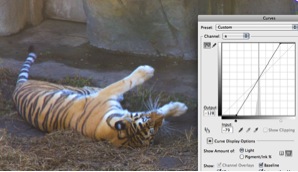
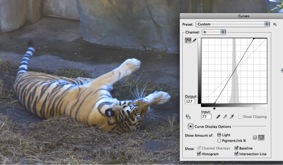
Let’s take another look at the tiger image to see how this works in practice.  On the left side in Fig 8 the channel a curves slider has been moved to the left resulting in a magenta cast.  On the right side the slider has been moved to the right giving a green cast.  I call the a channel the apple-green-magenta channel.  Don’t know if that will work for you, but if you look at Fig 9, you might guess what I’ll use for the b channel!

Fig 8: Moving the channel a curves slider

Fig 9: Moving the channel b curves slider


Moving the b slider to the right adds blue and moving to the left adds yellow.  I call the b channel the banana-yellow-blue channel.  You saw that coming, right?  No?  Doesn't matter but you might just remember it unless you eat magenta apples and blue bananas.  

Let’s combine slider movements so they are symmetrically equal as in Fig 10.  Using channel b, the tigers show a little more life with an equal boost to both the yellow and blue components.  That looks a little more realistic.  If the green and magenta are also increased in channel a, it gets even better. 

Fig 10: equal additions of blue and yellow in channel b followed by equal additions of magenta and green in channel a

So far I’ve just changed the color but not the lightness value.  The image is still a bit flat, lacking contrast. When the Lightness channel is adjusted, that changes as in Fig 11.  The tiger now has some life!

Fig 11: Bringing the tiger to life with the L channel


I could probably stop here, but I won’t because there is a sharpening trick that works really nicely in L.A.B.  Because the color channels are separate from the lightness channel, sharpening does not affect the colors.  I will combine this process with another for one last attempt to give life to the tiger.

Duplicate the original layer and merge in blend mode multiply.  Egad!  This is not an improvement!  Stay with me. 

Fig 12: Tigers thrown into the dark


Now add a mask and Image>Apply Image as in Fig 13.  Notice that the mask for the upper layer now has some black inside the frame.  This is a selection that we can adjust to change both the luminosity and sharpness.  Make sure the mask is selected before using Apply Image or adjusting the Feather slider in the following two steps.

Fig 13: Using Apply Image


Make sure the ‘mask’ window is viewable (if not Window>Masks) and move the feather slider to the right.  You should see a noticeable increase in sharpness as in Fig 14.  Notice the Density slider. If this slider is moved to the left, the effect of the mask is reduced and the image will approach its original appearance.  So if you want it a little bit darker, go for it.  I’m leaving it where it is now. 

Fig 14: Feather slider in Mask window to increase sharpness.


Fig 15: The tigers can now play


References:
Margulis, Dan "Photoshop LAB Color - The Canyon Conundrum and Other Adventures in the Most Powerful Colorspace," 2006, Peachpit Press, Berkeley.
Mark Lindsay, M.F.A. and a presentation to the Berkeley Camera Club on March 28, 2012
see Mark's work at marklindsayart.com

Saturday, March 24, 2012

Digital Noise and Photography

Digital Noise and Photography
Ken Osborn © 2012

Want perfect photos?  Not possible.  Why?  Well, even the most proficient photographer with the most perfect equipment must contend with noise in the image.  It does not matter whether the image has a full tonal range from  highlights to shadows, is low in contrast, is shot with low ISO or high ISO.  There will always be noise.

The more important question is how do we get acceptable control of noise in our images?  For starters, use a low ISO setting.  This will depend on available light, lens speed, motion in the subject, and whether you are using a tripod.  If, for example, you are shooting a dance scene under low light without a flash and no tripod, you will probably have to use a fairly high ISO.  Accept the inevitable noise.  If you are shooting a landscape with the camera on a tripod, then you can use a very low ISO.  There will be considerably less noise, but it will still be there.

Figure 1 shows Steps 2 and 14 from a Kodak Gray Scale.  The photograph was shot with a Pentax K5 at ISO 100.  The extreme pixel values of each histogram for Steps 2 and 14 were used to create smaller boxes that were then inserted into the corresponding Gray Scale images.


Figure 1  Kodak Gray Scale Noise Comparison

Can you count the number of small boxes in the Kodak Gray Step 2 ISO 100 image?  Including the box in the lower right with the black outline, you should see a total of 6.  Now count the boxes in the Kodak Gray Step 14 ISO 100 image.  Including the box in the lower left with the white outline, you should see a total of seven.  You don't see them?  Look at figure 2 then, which is the same as Figure 1 but with the exposure increased in Photoshop.  

Figure 2  Kodak Gray Scale Images Plus 2EV


So even at ISO 100, there is noise.  Also, the noise is equally important in both the highlights and the shadows.  In this particular instance, it appears that the noise impacts the highlights even more than it impacts the shadows.  Another lesson is that when you open the shadows, the noise becomes more noticeable.  Could that also be true for the highlights?  If you make them darker, could the noise become more troublesome?  Look at Figure 3.

Figure 3  Kodak Gray Scale Images Minus 2EV


The small boxes now stand out a bit more and the background is even more mottled than in Figure 1.  Lightening the shadows and darkening the highlights will accentuate the noise.  

Figure 4 is an animation showing what happens when the shadows are 'opened' by increasing the exposure in curves and the highlights are darkened by decreasing the exposure.  If the individual slides were not captioned, could you tell which of the 'auto curves' slides was for the highlights and which was for the shadows?  

I'll end this post with the observation that digital noise is not necessarily all that bad.  At one time Tri-X film was considered a last resort for the desperate and today we look at those old photos with lots of grain as art!  So maybe we shouldn't call it noise but call it digital grain.  

Credit line: the histograms used in generating the animation were produced using ImageJ from http://imagejdocu.tudor.lu/.  It is public domain software and is a powerful tool for the analytical dissection of digital images.  

Tuesday, March 13, 2012

Some Random Thoughts for Pi Day

Some Random Thoughts for Pi Day
Ken Osborn © 2012

Everyone at one time learned that Pi is the ratio of the circumference of a circle to its diameter and the value is 3.14 and a lot more digits following.  Is there an end to the digits and is the sequence of digits random or is it determined by some as of yet unknown formula?  And can the digits in Pi be produced by a random number generator?

I'll leave the first two questions to others, but a simple Excel program to generate random numbers can be used to produce an estimate of Pi.  Consider a circle with a diameter of 2 feet.  The radius will then be 1 foot and the area Pi square feet.  If it is enclosed inside a square, the square will have sides of 2 feet with an area of 4 square feet.   The ratio of areas of circle to square will then be Pi/4.  Suppose you now throw darts at a dart board with a diameter of 2 feet enclosed in a square.  The ratio of hits inside the board divided by the number of tosses inside the square will be the same as the ratio of areas.

Write a program to generate two sets of random numbers bounded by zero and one (0,1).  These will be the coordinates for a point to be tested.  If the distance of the ordered pair to the center is less than one it is inside the circle.  If it exceeds one it is outside the circle.  Below is a screen shot from one run of the program.  The blue line is the running estimate of Pi for the specified number of dart tosses.  The purple line is the error calculated as the difference between the estimate and value of Pi to 2 digits (3.14)


If you'd like to try estimating Pi using the program, you can at Estimating Pi Spreadsheet

Sunday, February 26, 2012

The Outlier Paradox and Global Warming

The Outlier Paradox and Global Warming
© Ken Osborn
Feb 2012


Hot winters ahead?  I can’t say for sure, but this last January seemed a lot warmer than a couple years ago when the winter was mild.  I checked the records for the city of Oakland (airport) and the daily highs for Jan 2012 averaged 2.3 degrees Fahrenheit (dF) warmer than Jan 2010.  That doesn’t seem like a lot.  But when I checked for the warmest days in 2010 and compared them to 2012 I saw that my impression that it seemed warmer this year than in 2010 was correct.  In 2010 two of the Jan daily high temperatures exceeded 60 dF and in 2012 there were 7 days in Jan exceeding 60 dF. 

So my impression that this winter was warmer was based not on the average of the daily high temperatures but rather the number of warmer than typical days.  This I call the Outlier Paradox: increasing means accelerates extremes.  Small changes in a data set's average are associated with large changes in the frequency of values exceeding some threshold value: these extreme values are also referred to as outliers.  This is a statistical property of numerical distributions, as I will try to explain.

Measurements repeatedly performed on any item and collected into a data set are frequently randomly distributed.  Given a large enough data set, if the individual results are randomly distributed, the shape of the plotted numbers will be symmetrical: values exceeding the average will balance nicely against numbers below the average in a mirror image fashion.  This is called a Normal distribution.  So are temperature records Normally distributed? 

Chart 1 is a plot of the Jan 2012 daily high temperature readings for the City of Oakland.  The data are ranked from low to high and plotted against the probability that a given measurement will exceed all other measurements in the set.  Except for the four highest values, the plotted temperature readings (red) nicely fit the curve for a Normal distribution (blue).  The curve is symmetrical around the center with roughly the same number of readings on either side.  Measurements close to the center have a higher probability and measurements far from the center a lower probability.  This is visualized by the flattening of the curve at the extreme ends. 

Chart 1: Testing temperature readings for Normality

An interesting property of Normal distributions is that even large changes in the extreme values have a smaller effect on the average.  When examining changes over time, averages only may be a poor predictor of environmental impacts if the outliers are ignored.  

As an example, see Chart 2.  Data set 1 represents a collection of measurements with an average of 100 and a standard deviation of 10%.  Approximately 4 out of 1000 measurements will exceed a threshold of 125.  Change the average to 105 and the number of measurements exceeding 125 increases to 16 out of 1000.  A 5% change in the average becomes a 400% change in the values exceeding a threshold just 25% above the average (100*16/4 = 400%).  An increase in the standard deviation will magnify the spread of extreme values even more. 


Chart 2: A small change in the mean is associated with large changes in the frequency of outliers

This property holds for any set of measurements taken over time when the distribution is Normal.  Records of rainfall, temperature, atmospheric pressure, and number of cars per hour passing a given point on the freeway can all be treated as Normal distributions.  Even though there are causal factors associated with each of these, any given measurement is randomly determined relative to the measurements that immediately precede or follow.  Though we know it may rain tomorrow, the exact number of inches of rain that will fall is an unknown until after the event.  

Returning to the records for the City of Oakland for Jan of 2010 and 2012, let’s take a statistical look at the distribution of daily high readings (Chart 3).  The average high temperature for Jan 2010 was 55.7 degrees Fahrenheit (dF) and the variance as measured by the standard deviation was 2.6 dF.  For 2012 the Jan average high temperature was 58 dF and the standard deviation 4.9.  Using the lower 2010 variance for both years, the fitted Normal curves predict 5% of days exceeding 62 dF for 2012 and 0.8% for 2010.


Chart 3: Comparison of Jan High Temperatures for 2010 and 2012 using 2010 Variance

Chart 3 demonstrates the effect of changing the mean of a distribution of data but not the standard deviation.  The curve shifts horizontally to the right for an increase in the mean with each individual point moving the same amount so that the two curves are parallel to each other. 

Of course the variance was not the same for the two years, and when the change in variance is considered (Chart 4), the differences are even greater with a prediction of 21.8% of the days exceeding 62 dF for 2012 compared to the 0.8% for 2010. 

Chart 4: Comparison of Jan High Temperatures for 2010 and 2012

When both the standard deviation and mean are changed, the curve not only shifts laterally but also rotates.  Chart 5 using a hypothetical set of temperature demonstrates what happens when the mean is fixed mean but the standard deviation changes.  Here the curve rotates around the center but the center does not move horizontally.   Thus if two sets of temperature records (or any measurement records) have the same average but different standard deviations, the set with the higher standard deviation will have more extreme values at both the high and low temperatures.   


Chart 5:  Changing only the standard deviation rotates the curve around the mid-point
  
The extra warm days of Jan 2012 should not be taken in isolation to determine whether global warming is a reality.  These data represent a narrow temporal and spatial snapshot.  Next winter may bring even warmer winter days or it could bring winter lows that are the lowest of the decade.  While we might take note of unusually extreme temperatures, it is the preponderance of data that must answer the question of whether an apparent trend is merely a statistical excursion or a real trend.  


Ref: http://www.wunderground.com/history/airport/KOAK/2010/1/1/MonthlyHistory.html?req_city=NA&req_state=NA&req_statename=NA


Friday, February 10, 2012

Predator - Prey: Part III - The Interactive Model

Forage (aka carrying capacity) feeds the deer; deer feed the wolves; wolves keep the deer herd in balance with the forage.  It's a nice model, but things don't always work that smoothly.  Two previous posts discuss a mathematical model written in Excel that interactively explores some of the possible outcomes given initial conditions of deer herd size, number of wolves, intrinsic growth rates of deer and wolves, and the carrying capacity and carrying capacity variance factor.  This latter is a random card designed to incorporate the unpredictable effects of climatic variation, forage decline, or other things that can change the amount of forage but are not predictable from one year to the next.

Previous posts on this topic are at:


http://misterkenblog.blogspot.com/2012/01/predator-vs-prey-mathematical-model.html
http://misterkenblog.blogspot.com/2011/12/predator-vs-prey-will-wolves-dominate.html

Ready to try you hand at creating your own scenarios?  A simplified interactive model programmed in an Excel spreadsheet is available for the curious in Google Docs at
https://docs.google.com/spreadsheet/ccc?key=0AixHzIqC4EIYdGJ6VFgyLUl3UERKUEF4RUw1Z0dVMkE

There are eight variables in the model you can work with shown in the diagram below.

The population size of the deer herd (here it is 5000), deer growth rate, carrying capacity for the deer herd, variance in carrying capacity (K), wolf population (here it is 10), wolf pack growth rate, predator efficiency, and number of deer required for wolf survival.  You can change any and all of these starting numbers to see what happens.  For example, to evaluate the effect of dramatic swings in climate try changing the variance in K (now at 2000) to a higher or lower number.  A higher number would represent greater unpredictability and a lower number a more stable environment.

Have fun.

Tuesday, January 31, 2012

Predator vs Prey - A Mathematical Model - Part 2 of a 3 Part Series

In the first installment of my predator-prey model I presented graphs of population growth under three scenarios that included deer and forage but no predators.  Scenario 1 was for a stable environment (i.e, constant carrying capacity): the deer herd rapidly grew from a starting population until it reached the carrying capacity then leveled out.  Scenario 2 was a moderately variable environment and the deer initially grew but the population fluctuated above and below the carrying capacity.  Scenario 3 was for a highly variable environment.  In this last case, the deer herd grew, fluctuated in number, then crashed and died out.  For a more complete review see http://misterkenblog.blogspot.com/2011/12/predator-vs-prey-will-wolves-dominate.html.

What happens when predators are introduced?  Will the deer herd die out sooner or will it stabilize because wolves keep the deer herd in check with the environment?  Can predictions even be made?  Let's see.

Scenario 1: Start with a deer herd well below the carrying capacity, a small number of wolves, and a constant environment.


The starting conditions are an initial deer population (N) of 5000, a growth rate (R) of 0.5(50% increase in deer herd per generation), carrying capacity (K) of 20000, no variance in the carrying capacity (KV=0), 5 wolves, a reproductive capacity of 0.1 (10%), and a predator efficiency (E) of 0.53 (53% - VERY good hunters), and a requirement (S) of 24 deer/wolf/year to sustain wolf pack growth.

Both the deer herd and wolf pack show rapid initial growth, followed by oscillations of population size, and finally a steady state based on the carrying capacity for the deer herd.  The final steady state is well above the starting conditions for both deer and wolves and the final state for the deer is about half of the carrying capacity.
Predation in Stable Environmet


Scenario 2: Add global warming or some other factor to make the environment variable


The variance for the carrying capacity has been increased from 0 to 1000, or a variance factor of 20% (100x1000/5000).

The oscillations in both deer and wolves has increased and no steady state is achieved although after 500 generations it does not appear that neither deer nor wolves are in danger of extinction.

Add Moderate Amount of Environmental Variability


Scenario 3: Scenario 2 with more predation by increasing the wolf pack from an initial 5 to 50


Increasing the initial number of wolves from 5 to 50 does not change the overall dynamics.  It would appear that starting with an initial wolf pack of fewer than what is sustainable has little long term effect.  I leave it for the reader to try other starting wolf pack sizes once I have posted the interactive spreadsheet.

Increase Predation Pressure


Scenario 4: Keep the starting wolf population at 50 and increase the environmental variability


Increasing the variance in carrying capacity to 100% dramatically shifts the oscillations in both the deer herd size and wolf pack numbers. While neither population crashes, they come perilously close.  I leave it to the reader to try more simulations to see if the wolves, or deer, or both go to extinction under these conditions.

Increase Environmental Variability


Scenario 5: Same as scenario 4 with initial carrying capacity cut in half


In this last scenario, the deer herd crashes and the wolves, lacking a food supply, follow.

Reduce Carrying Capacity

Whether the wolves control the deer population or the deer control the wolf population is still an open question, but clearly the environment controls both.  When the deer herd exceeds the carrying capacity of the environment extremes from one year to the next will ultimately result in a population crash.  In the absence of predation, by this model, the deer herd will subsist only if the environment is very stable.  If the environment is not stable (the normal course of events) predation pressure can help stabilize the deer herd by reducing the herd size and the odds that the deer herd will not exceed the carrying capacity are improved.  Of course if the deer herd crashes so will the predators unless they have a reserve food source.  That in fact is the case, but then it becomes a matter of energetics and whether switching to an alternative food supply for the predator is analogous to a drop in carrying capacity for the prey.


 Next month I will post a link to the statistical model so that the reader can try some scenarios and draw their own conclusions.


Thursday, December 29, 2011

Views from Treasure Island

8877AngrySky.jpg8799AlcatrazBW.jpg8840_1_2_AlcatrazAtNight_PM41tonemapped.jpg8841_2_3_AlcatrazAtNightV3_PM41tonemapped.jpg8844AlcatrazAtNight3EVOver.jpg8857_8_9_FogInThePink_PM41tonemapped.jpg
8893_4_5_6_7_SanFranciscoSkylineAndDramaticSky_PM41tonemapped.jpg8966_9_SanFranciscoSkylineAtNight_Pano.jpg8975_6_7_8_9_BayBridgeTower_PM41tonemapped.jpg9019SanFranciscoXmasLights.jpg9024_5_6_CoitTowerAtNight_PM41fused.jpg

Views from Treasure Island, a set on Flickr.

San Francisco skyline at night, fog rolls across the Bay, Alcatraz in black and white and color, Bay Bridge SAS Tower, and a very dramatic sky

Wednesday, December 14, 2011

Predator vs Prey - Will the Wolves Dominate?

An occasional excursion from topics photographic into the realm of mathematics and statistical modeling.  I will cover some modeling mathematics for the interactions of predatory and prey in a series of three posts and include a program for the reader to use for further exploration.
**********************************************************************************

Introduce a herd of deer into a forest.  Let the population grow.  Now add a predator, like a family of wolves.  What will happen?  It depends.  A modeling program can be useful to explore the possibilities.

According to some basic principles of ecology, populations grow following some fairly simple mathematics.  Thomas Malthus (http://en.wikipedia.org/wiki/Thomas_Robert_Malthus) was familiar with these principles and the basics have not changed much since then.  A given population of mice, squirrels, deer, or humans has an intrinsic rate of growth that is limited by the carrying capacity of the environment.

Stating this in mathematical terms:

Population at time T+1 = Population at time T + Growth between T and T+1
Growth = intrinsic rate of growth x carrying capacity of the environment

Of course the carrying capacity is not a constant.  For example, advances in food production technology can increase the food availability for growth of human populations.  Conversely, climatic variation could result in vegetative variation causing swings in the carrying capacity for a theoretical population of deer.

Shown in the first chart is the plot of a deer herd population that grows under ideal conditions: the carrying capacity is reasonably fixed and there are no predators to eat the deer.  They live a happy, idilic life.  At the start there is a herd of 5000 deer growing at a rate of 50%/year (they are VERY randy deer).  The carrying capacity (blue line) is 20000 and the relative variability in the carrying capacity is less than 1%.  The deer herd (green line and green dots) grows rapidly until it reaches the carrying capacity and stabilizes without further variation.  The wolf family (red) has not been introduced yet so the red line is flat with a constant value of zero.


Chart 1: Constant carrying capacity and no predators


Of course, if the environment is not constant, neither will the carrying capacity be constant.  If variation is added to the equation for carrying capacity, the deer population will also fluctuate as in the next chart where the carrying capacity has been assigned a variability of 40%.  The variation in the deer herd (green) matches the variation in the carrying capacity (blue).  Over the short term, the deer herd survives, with a population size that sometimes exceeds and other times is lower than the average carrying capacity. 

Chart 2: Variable carrying capacity and no predators


When the carrying capacity variation is increased to 50%, the deer herd still shows rapid growth initially from a starting value of 5000 until it reaches the carrying capacity of 20000, then drops rapidly to 10000, rebounds, but then crashes to zero.  Of course, once the herd size reaches zero, it is difficult to rebound and the population remains at zero after just 20 generations.  

Chart 3: Highly variable carrying capacity and no predators


In the next posting I will introduce a family of wolves and see how this changes the dynamics of the herd's population growth.  In the last posting I will provide you with a programmed spreadsheet where you can experiment with different starting conditions and see for yourself how the environment, prey, and predator interact.