


Napa Photo Safari with Frederic Larson, a set on Flickr.
When Frederic Larson, former photojournalist with the San Francisco Chronicle, offered a photography workshop set in the Napa Valley, it was an opportunity to not only learn a few new photo tricks but to sample a few good wines.
Monday, October 03, 2011


Tuesday, September 20, 2011
Correcting Color Casts in Photoshop
1) duplicate the original layer, in this example a scenic with a strong red cast

2) Apply Filter>Blur>Average to get ...

... a layer of just one color - the color cast with RGB values of 123:108:118


3) Invert the color layer ...
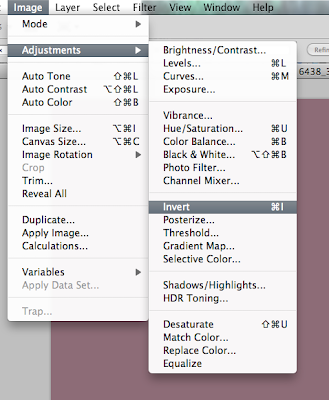
... to get the complementary (opposite) color with RGB values of 114:148:138
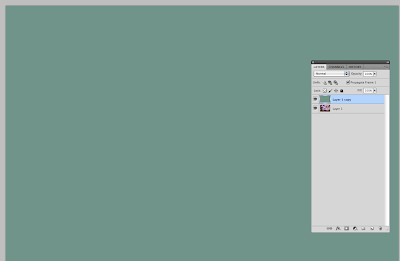
4) Blend Color mode


... to get the complementary (opposite) color with RGB values of 114:148:138

4) Blend Color mode

5) Change opacity to 10-40%

6) If it looks 'flat' add a bit of saturation. As this looks ok to me, I did not add any saturation. Compare the color cast removed version (this one) with the original in step 1 above.

Based on a presentation to the Berkeley Camera Club by Bernadette Talbot
A nice YouTube 'how to' by Tim Grey at http://www.youtube.com/watch?v=UAQsOeCCrAY
Wednesday, September 07, 2011
Sweet stuff - Time Lapse Photo-microscopy With an iPad 2
Sugar dissolves in water, right? Coffee drinkers know that and some who drink tea do too, but what happens if you put in more sugar than the water can hold? Place a few crystals of sugar on a microscope slide. Add a small drop of water and watch. If you are patient, you will see that at first the crystals dissolve rapidly, then the process slows and eventually seems to stop. As the water surrounding the sugar crystals hold more sugar molecules, the water becomes saturated. As molecules of sugar leave the surface of a crystal more molecules in the water return to the surface of the crystal. When the rates are equal, the water can hold no greater concentration and the crystals stop dissolving.
What if you put just one crystal into a drop of water? Or what if you added even more water to the saturated solution? To find out, watch the video.
http://youtu.be/bdEZ3W0croY
What if you put just one crystal into a drop of water? Or what if you added even more water to the saturated solution? To find out, watch the video.
http://youtu.be/bdEZ3W0croY
Thursday, August 04, 2011
Photomicrography Using the iPad 2 Camera
The use of digital cameras to capture what can be seen in a microscope is fairly standard in science laboratories, but adapters to fit camera to microscope can be expensive. Now I'm not suggesting you buy yourself an iPad to avoid the expense of a microscope adapter, but if you already have one...
You do not need an adapter for the iPad to take shots through a microscope. It's only necessary to bring the camera lens as close as possible to the eyepiece lens. The effective magnification will be the product of the magnifying powers of microscope eyepiece and objective lens. Of course, the higher the magnification the more difficult it will be to get an alignment of iPad and microscope. Take a look at the video if this doesn't make sense.
Saturday, July 16, 2011
Moore's Law and Digital Photography
Kenneth Osborn
Misterken Photography
© July 17, 2011
“The complexity for minimum component costs has increased at a rate of roughly a factor of two per year... Certainly over the short term this rate can be expected to continue, if not to increase.”
Moore, Gordon E. (1965). "Cramming more components onto integrated circuits"
I entered the digital domain of photography in 2001 with a point and shoot Olympus 3000 that had an incredible resolution of 3 mega-pixals! I was using a MAC cube computer with 20 Giga-bytes (GB) of storage, seemingly massive quantities of capacity that would surely serve me for a long time. Compared to text files, image files seemed large at 600 Kilo-bytes (KB), but 20 GB could hold over 30,000 images from my Olympus, enough for years to come!
And then came the digital revolution with new cameras capable of resolutions approaching and exceeding the 35 mm format of the nearly forgotten days of film and wet chemistry. Now image file sizes of 20-30 MB are common and digital imaging chips in cameras are capable of holding several GB of images. Even one Tera-byte (TB) drives seem inadequate. My personal collection numbers 123,000 stored images filling some 600 GB of storage and that does not include backups. Will Moore’s Law get us through the next decade? Will we be able to afford to continue our passion for digital photography as the technology makes today’s cameras as obsolete as today’s cameras outshine those of a decade ago?
So with a database of 123,000 images spread amongst 973 master folders, how does the growth of this one photographer’s obsession compare to the projected growth of storage capabilities if Moore’s Law applies?
Collecting the data into a useable format that could be analyzed in Excel ® or a statistical package was not straight forward. However, a small readily written program was run in Apple’s command line interface (CLI) to collect file sizes, designations, and file dates and write the results to a text file that could be parsed and analyzed in Excel ®.
To understand how differing growth rates may positively or negatively affect the future of digital photography, it is helpful to take a look at the mathematics of growth. Growth in any system, whether it is digital image files, your bank account, trees in a forest, books in your library, or weeds in your garden can be simple or compound. Systems of simple growth seem to be limited to things like shelves for your books, freeways, and the plants you want to cultivate while compound growth seems to be a property of weeds, your growing collection of books, and cars on the freeway.
Chart #1 is an example comparing simple versus compound growth for $1000 placed in an interest bearing account paying 10% per year. The red bars represent what happens when the interest is compounded and the blue bars represent simple growth. I need not elaborate which is the better investment.

Chart I: Compound versus simple growth of $1000 invested at 10%
Storage needs (yours) and storage capacity (Moore’s Law) follow a compound growth curve. An interesting thing about compound growth is how it seems to accelerate with time. Looking at Chart I, note that for the first few years there is little difference between compound and simple growth. If the growth rate is increased, the acceleration becomes even more obvious as in Chart II.

Chart II: Comparison of two rates of compound growth
When there is a large difference between two rates of compound growth, there is a rapid separation. Like a rapidly growing need for storage versus a slower growing storage capacity.

Chart III: Annual growth in number of photographic events (as folders) and average folder size from the period 2001 to mid-2011

Chart IV: Annual growth in image storage requirements in GB
The question remains: has the growth rate of my image file requirements exceeded the growth rate for future storage capacity as predicted by Moore’s Law. Chart V is Moore’s Law plotted on log chart paper.

Chart V: Moore’s Law of capacity versus year plotted on a logarithmic scale
Reference: http://en.wikipedia.org
A logarithmic transformation of the data in Chart IV provides Chart VI, showing a similarity to Moore’s law rate of growth. The data are plotted in blue and a linear trend line is plotted in black. So how does the slope of the trend line in Chart VI compare to the fitted curve in Chart V for Moore’s Law?

Chart VI: Logarithmic transformation of annualized growth in folder sizes for my photos
Note that while the units in Charts V and VI appear to be different, 0.001 to 1000 for Chart V and 0 to 3 for Chart VI, since the logarithm of 1000 = 3, log 100 = 2, etc, the units are conformable. If the scales of the two charts are made to conform on the Y-axis, then the two straight lines can be compared directly. This is performed by physically scaling the log-transform chart to match the 3 with the 1000 on Moore’s Law plot and the 0 with 1. The log-transform plot is then moved laterally until the two straight lines are close, but sufficiently separated to determine if one has a steeper angle than the other. If Moore’s Law will be exceeded, then the linear trend line for my folder growth will have a steeper angle. Chart VII answers that question. The green dots are the data for the Moore’s Law plot, the blue connected dots are the logarithmic transformed digital photography data, and the straight lines of the two plots are parallel and neither growth rate exceeds the other.

Chart VII: Comparison of Moore’s Law plot versus digital photos storage growth by direct superimposition and scaling of charts V and VI.
My conclusion is that storage capacity will provide my storage requirement needs for the near future. Of course, I’m now starting to experiment with video….
References:
3)
Wednesday, June 22, 2011
Writing a How-to Procedure for Your Camera Club
Camera club "how-to' instructions bugging you? Have you just tried uploading an image for competition and wasted an hour because the instructions were not understandable? Do you sometimes think you could do a better job at writing instructions yourself? I think you can. Here are some suggestions and an example for writing a clear, concise, and usable set of instructions. I am using a draft procedure from the Berkeley Camera Club as an example. Now you should try the same with your group but you'll have to design your own logo!
"How-to" procedures for a club should conform to a standardized format. At a minimum, each procedure should have a title, procedure number, and date the procedure was written. If your group is growing, changing, or open to suggestions from your membership, also consider adding a revision number, group identification, and a group logo.
The logo, group identification, date, procedure number, and revision number should be placed in a header, as in figure 1 below.

Below the header, place the title and text of the procedure. The procedure can usually be divided into two parts, a background and a procedure. The background provides an overview, purpose, and context while the procedure is the set of instructions to be followed.


"How-to" procedures for a club should conform to a standardized format. At a minimum, each procedure should have a title, procedure number, and date the procedure was written. If your group is growing, changing, or open to suggestions from your membership, also consider adding a revision number, group identification, and a group logo.
The logo, group identification, date, procedure number, and revision number should be placed in a header, as in figure 1 below.

Figure 1: Header Information

Figure 2: Example Procedure, Page 1
Since you belong to a camera club, you are probably familiar with Photoshop, Lightroom, or some other software for processing images. These can be useful in constructing written instructions, especially if you use screen shots that can then be imported into Photoshop/Lightroom for further processing. The screen shot in figure 2, above, required no further processing to highlight the My Galleries selection. Not all screen shots will provide such nice highlighting to direct the attention of the reader.
I like to use arrows, colored yellow or orange or red, to direct the reader's attention. Draw an arrow in Photoshop and save it as a layered image (e.g., psd). This will allow you to open the file later and use the arrow without having to remove the background. Note that since the image below has been compressed (e.g., jpg), it has a white background, but the layered version has a clear background.
Figure 3: Arrow to Direct Attention
Now that you have an arrow you can use it in any of the screen clips where you want to direct the reader's attention, like in page 2 of the example procedure in figure 4 below.

Figure 4: Adding Arrows to Direct Attention
That's about it, except you should always follow up with feedback and comments from others to find out if your procedure works the way you think it should. And of course, after several months go by there will probably be some complaints and a rewrite. That's where the revision number comes in handy. And maybe you might help someone else do the revision!
Sunday, June 19, 2011
57th Annual North Beach Festival


57th Annual North Beach Festival, a set on Flickr.
North Beach is no longer the haven for poets, free thinkers, and other artists that it was in the 60's.
The North Beach Festival, now in its 57th year, has echos from that era but those echos are faint and perhaps unintelligible to those who did not live through those tumultuous times.
The Beat Museum is wonderfully quaint and evoked some distant memories making me think I might read Kerouac's "On the Road" and see if it was still relevant. Maybe not.
Coit Tower is still relevant and though I've been in the area many times had not seen the W.P.A. murals until now. Worth a return to the SFAI gallery to see Diego Rivera's murals.
And if you visit North Beach, try The Stinking Rose for dinner. The food's tasty and the atmosphere is great (lot's of garlic!!).
Subscribe to:
Posts (Atom)


